
258 lines
19 KiB
Markdown
258 lines
19 KiB
Markdown
# GPT Image 2 Skill
|
||
|
||
**A focused image-generation / editing skill for GPT Image 2, with a single SKILL definition that adapts to three runtime modes — local generation, host-native delegation, and pure prompt advisor.**
|
||
|
||
[中文文档](./README.zh-CN.md) · [Back to collection root](../../README.md)
|
||
|
||
|
||
|
||
---
|
||
|
||
## What it does
|
||
|
||
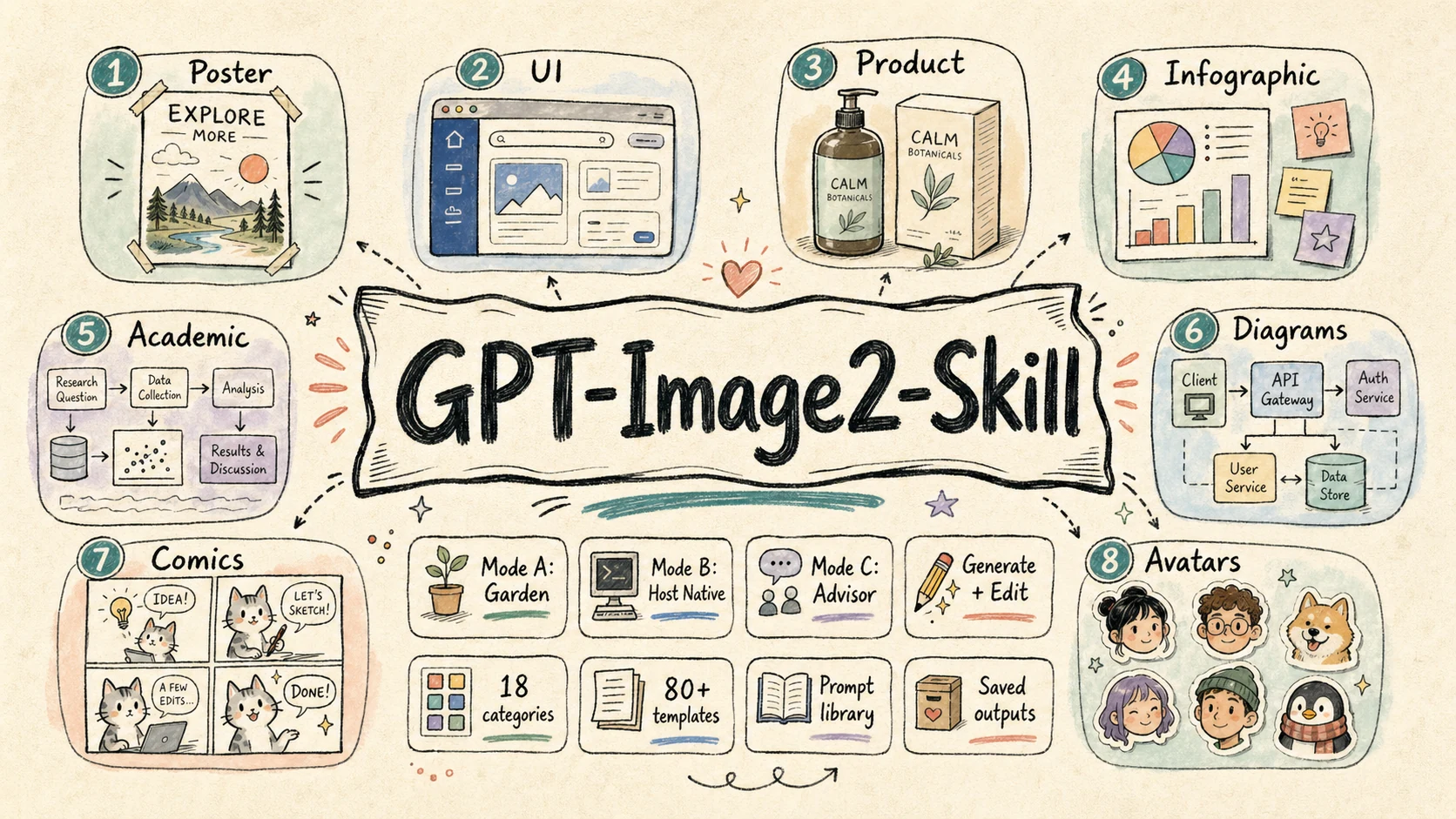
This skill is a structured prompt-engineering and image-generation pack built around the GPT Image 2 model (and OpenAI-compatible image endpoints). It only does two image tasks — `POST /images/generations` and `POST /images/edits` — but it does them in three different runtime environments without changing user-facing behavior.
|
||
|
||
It bundles:
|
||
|
||
- A **mode-aware workflow** so the same skill works whether the agent itself owns the image API key, the host has its own image tool, or there is no image tool at all.
|
||
- A **structured template library** of 18 categories and 79 prompt templates covering posters, UI mockups, product visuals, infographics, academic figures, technical diagrams, comics, avatars, and editing workflows.
|
||
- **Reproducible prompt + image archival** under `garden-gpt-image-2/prompt/` and `garden-gpt-image-2/image/` with task-slug + timestamp naming.
|
||
|
||
---
|
||
|
||
## The three runtime modes
|
||
|
||
The very first thing this skill does on any task is run a tiny detection script:
|
||
|
||
```bash
|
||
node skills/gpt-image-2/scripts/check-mode.js
|
||
# or for structured output:
|
||
node skills/gpt-image-2/scripts/check-mode.js --json
|
||
```
|
||
|
||
The output picks one of three modes:
|
||
|
||
| Mode | Trigger | Behavior |
|
||
|---|---|---|
|
||
| **A — Garden local** | `ENABLE_GARDEN_IMAGEGEN` truthy **AND** `OPENAI_API_KEY` present | End-to-end: pick template → render prompt → call `generate.js` / `edit.js` → image lands on disk |
|
||
| **B — Host-native** | Garden disabled, but the host agent already has an image tool (`image_generation`, `dalle`, `nano_banana`, image MCP, etc.) | Render the prompt, then **delegate** image generation to the host's own tool |
|
||
| **C — Advisor** | Garden disabled, host has no image tool | Skill degrades into a high-quality prompt writer — saves the rendered prompt to `garden-gpt-image-2/prompt/` and instructs the user to paste it into ChatGPT / Midjourney / DALL·E / Sora / Nano Banana / their own gateway |
|
||
|
||
In all three modes, prompt files are saved (mode A & C must save, mode B is recommended for reuse). Only mode A produces an image file; mode B leaves that to the host, mode C cannot.
|
||
|
||
---
|
||
|
||
## Quick start
|
||
|
||
### 0. Detect the mode (always step 0)
|
||
|
||
```bash
|
||
node skills/gpt-image-2/scripts/check-mode.js
|
||
```
|
||
|
||
The commands below (1–4) only apply in **Mode A**.
|
||
|
||
### 1. Text-to-image
|
||
|
||
```bash
|
||
node skills/gpt-image-2/scripts/generate.js \
|
||
--prompt "A cute baby sea otter" \
|
||
--size 1024x1024 \
|
||
--quality high
|
||
```
|
||
|
||
### 2. Generate from a saved prompt file
|
||
|
||
```bash
|
||
node skills/gpt-image-2/scripts/generate.js \
|
||
--promptfile garden-gpt-image-2/prompt/poster-20260424-153045.md
|
||
```
|
||
|
||
### 3. Edit an existing image
|
||
|
||
```bash
|
||
node skills/gpt-image-2/scripts/edit.js \
|
||
--image assets/source.png \
|
||
--prompt "Replace the background with a clean studio scene"
|
||
```
|
||
|
||
### 4. Mask-based local edit
|
||
|
||
```bash
|
||
node skills/gpt-image-2/scripts/edit.js \
|
||
--image assets/source.png \
|
||
--mask assets/mask.png \
|
||
--prompt "Replace only the masked area with a glass vase"
|
||
```
|
||
|
||
For Mode B / C there is no CLI entry point — the skill just renders the final prompt and either hands it to the host's image tool (B) or shows it to the user (C).
|
||
|
||
---
|
||
|
||
## Case Gallery
|
||
|
||
The public case library covers 18 categories, 79 templates, and 160+ generated / edited results. This gallery is a curated map of the most important capability families: each thumbnail opens the live case page, while the image itself is served from the dedicated `ConardLi/gpt-image-2-101` case repository.
|
||
|
||
### UI Mockups
|
||
|
||
<table>
|
||
<tr>
|
||
<td width="50%" align="center"><a href="https://gpt-image2.mmh1.top/#/case/ui-mockups%2Flive-commerce-ui%2F1"><img src="https://cdn.jsdelivr.net/gh/ConardLi/gpt-image-2-101@main/public/case/ui-mockups/live-commerce-ui/1-thumb.webp" alt="Live commerce UI case" width="100%"></a><br/><strong><code>live-commerce-ui</code></strong><br/><sub>Celebrity livestream commerce interface.</sub></td>
|
||
<td width="50%" align="center"><a href="https://gpt-image2.mmh1.top/#/case/ui-mockups%2Fsocial-interface-mockup%2F3"><img src="https://cdn.jsdelivr.net/gh/ConardLi/gpt-image-2-101@main/public/case/ui-mockups/social-interface-mockup/3-thumb.webp" alt="Social interface mockup case" width="100%"></a><br/><strong><code>social-interface-mockup</code></strong><br/><sub>Official product announcement in a social feed.</sub></td>
|
||
</tr>
|
||
<tr>
|
||
<td width="50%" align="center"><a href="https://gpt-image2.mmh1.top/#/case/ui-mockups%2Fproduct-card-overlay%2F1"><img src="https://cdn.jsdelivr.net/gh/ConardLi/gpt-image-2-101@main/public/case/ui-mockups/product-card-overlay/1-thumb.webp" alt="Product card overlay case" width="100%"></a><br/><strong><code>product-card-overlay</code></strong><br/><sub>Skincare landing-page hero with product, model, and badges.</sub></td>
|
||
<td width="50%" align="center"><a href="https://gpt-image2.mmh1.top/#/case/ui-mockups%2Fchat-interface-scene%2F3"><img src="https://cdn.jsdelivr.net/gh/ConardLi/gpt-image-2-101@main/public/case/ui-mockups/chat-interface-scene/3-thumb.webp" alt="Chat interface scene case" width="100%"></a><br/><strong><code>chat-interface-scene</code></strong><br/><sub>Claude-style assistant screenshot with structured conversation.</sub></td>
|
||
</tr>
|
||
</table>
|
||
|
||
### Product And Branding
|
||
|
||
<table>
|
||
<tr>
|
||
<td width="50%" align="center"><a href="https://gpt-image2.mmh1.top/#/case/product-visuals%2Fexploded-view-poster%2F2"><img src="https://cdn.jsdelivr.net/gh/ConardLi/gpt-image-2-101@main/public/case/product-visuals/exploded-view-poster/2-thumb.webp" alt="Exploded view poster case" width="100%"></a><br/><strong><code>exploded-view-poster</code></strong><br/><sub>Vision Pro 2 optical and compute-module teardown.</sub></td>
|
||
<td width="50%" align="center"><a href="https://gpt-image2.mmh1.top/#/case/product-visuals%2Fpremium-studio-product%2F1"><img src="https://cdn.jsdelivr.net/gh/ConardLi/gpt-image-2-101@main/public/case/product-visuals/premium-studio-product/1-thumb.webp" alt="Premium studio product case" width="100%"></a><br/><strong><code>premium-studio-product</code></strong><br/><sub>Luxury skincare still life for editorial product pages.</sub></td>
|
||
</tr>
|
||
<tr>
|
||
<td width="50%" align="center"><a href="https://gpt-image2.mmh1.top/#/case/branding-and-packaging%2Fcosmetic-packaging%2F1"><img src="https://cdn.jsdelivr.net/gh/ConardLi/gpt-image-2-101@main/public/case/branding-and-packaging/cosmetic-packaging/1-thumb.webp" alt="Cosmetic packaging case" width="100%"></a><br/><strong><code>cosmetic-packaging</code></strong><br/><sub>Premium skincare gift box with material polish.</sub></td>
|
||
<td width="50%" align="center"><a href="https://gpt-image2.mmh1.top/#/case/branding-and-packaging%2Fbeverage-label-design%2F1"><img src="https://cdn.jsdelivr.net/gh/ConardLi/gpt-image-2-101@main/public/case/branding-and-packaging/beverage-label-design/1-thumb.webp" alt="Beverage label design case" width="100%"></a><br/><strong><code>beverage-label-design</code></strong><br/><sub>Guochao sparkling-water bottle label and commercial scene.</sub></td>
|
||
</tr>
|
||
</table>
|
||
|
||
### Editing Workflows
|
||
|
||
<table>
|
||
<tr>
|
||
<td width="50%" align="center"><a href="https://gpt-image2.mmh1.top/#/case/editing-workflows%2Fbackground-replacement%2F1"><img src="https://cdn.jsdelivr.net/gh/ConardLi/gpt-image-2-101@main/public/case/editing-workflows/background-replacement/1-thumb.webp" alt="Background replacement case" width="100%"></a><br/><strong><code>background-replacement</code></strong><br/><sub>Portrait moved into Times Square night ambience.</sub></td>
|
||
<td width="50%" align="center"><a href="https://gpt-image2.mmh1.top/#/case/editing-workflows%2Fobject-removal%2F1"><img src="https://cdn.jsdelivr.net/gh/ConardLi/gpt-image-2-101@main/public/case/editing-workflows/object-removal/1-thumb.webp" alt="Object removal case" width="100%"></a><br/><strong><code>object-removal</code></strong><br/><sub>Remove unwanted people from a graduation group photo.</sub></td>
|
||
</tr>
|
||
<tr>
|
||
<td width="50%" align="center"><a href="https://gpt-image2.mmh1.top/#/case/editing-workflows%2Fproduct-retouching%2F1"><img src="https://cdn.jsdelivr.net/gh/ConardLi/gpt-image-2-101@main/public/case/editing-workflows/product-retouching/1-thumb.webp" alt="Product retouching case" width="100%"></a><br/><strong><code>product-retouching</code></strong><br/><sub>Commerce-grade AirPods product cleanup.</sub></td>
|
||
<td width="50%" align="center"><a href="https://gpt-image2.mmh1.top/#/case/editing-workflows%2Fportrait-local-edit%2F1"><img src="https://cdn.jsdelivr.net/gh/ConardLi/gpt-image-2-101@main/public/case/editing-workflows/portrait-local-edit/1-thumb.webp" alt="Portrait local edit case" width="100%"></a><br/><strong><code>portrait-local-edit</code></strong><br/><sub>Hair color and style edit while preserving identity.</sub></td>
|
||
</tr>
|
||
</table>
|
||
|
||
### Infographics And Visual Docs
|
||
|
||
<table>
|
||
<tr>
|
||
<td width="50%" align="center"><a href="https://gpt-image2.mmh1.top/#/case/infographics%2Fbento-grid-infographic%2F1"><img src="https://cdn.jsdelivr.net/gh/ConardLi/gpt-image-2-101@main/public/case/infographics/bento-grid-infographic/1-thumb.webp" alt="Bento grid infographic case" width="100%"></a><br/><strong><code>bento-grid-infographic</code></strong><br/><sub>iPhone 16 Pro feature breakdown in a compact grid.</sub></td>
|
||
<td width="50%" align="center"><a href="https://gpt-image2.mmh1.top/#/case/infographics%2Fcomparison-infographic%2F1"><img src="https://cdn.jsdelivr.net/gh/ConardLi/gpt-image-2-101@main/public/case/infographics/comparison-infographic/1-thumb.webp" alt="Comparison infographic case" width="100%"></a><br/><strong><code>comparison-infographic</code></strong><br/><sub>Phone comparison designed for decision support.</sub></td>
|
||
</tr>
|
||
<tr>
|
||
<td width="50%" align="center"><a href="https://gpt-image2.mmh1.top/#/case/slides-and-visual-docs%2Fdense-explainer-slides%2F2"><img src="https://cdn.jsdelivr.net/gh/ConardLi/gpt-image-2-101@main/public/case/slides-and-visual-docs/dense-explainer-slides/2-thumb.webp" alt="Dense explainer slide case" width="100%"></a><br/><strong><code>dense-explainer-slides</code></strong><br/><sub>One-page AI Agent mechanism explainer.</sub></td>
|
||
<td width="50%" align="center"><a href="https://gpt-image2.mmh1.top/#/case/slides-and-visual-docs%2Fvisual-report-page%2F1"><img src="https://cdn.jsdelivr.net/gh/ConardLi/gpt-image-2-101@main/public/case/slides-and-visual-docs/visual-report-page/1-thumb.webp" alt="Visual report page case" width="100%"></a><br/><strong><code>visual-report-page</code></strong><br/><sub>Business summary page with KPI cards and chart rhythm.</sub></td>
|
||
</tr>
|
||
</table>
|
||
|
||
### Academic And Technical
|
||
|
||
<table>
|
||
<tr>
|
||
<td width="50%" align="center"><a href="https://gpt-image2.mmh1.top/#/case/academic-figures%2Fmethod-pipeline-overview%2F1"><img src="https://cdn.jsdelivr.net/gh/ConardLi/gpt-image-2-101@main/public/case/academic-figures/method-pipeline-overview/1-thumb.webp" alt="Method pipeline overview case" width="100%"></a><br/><strong><code>method-pipeline-overview</code></strong><br/><sub>RAG-based long-context QA pipeline for papers.</sub></td>
|
||
<td width="50%" align="center"><a href="https://gpt-image2.mmh1.top/#/case/academic-figures%2Fneural-network-architecture%2F2"><img src="https://cdn.jsdelivr.net/gh/ConardLi/gpt-image-2-101@main/public/case/academic-figures/neural-network-architecture/2-thumb.webp" alt="Neural network architecture case" width="100%"></a><br/><strong><code>neural-network-architecture</code></strong><br/><sub>ViT-B/16 architecture figure with tensor flow.</sub></td>
|
||
</tr>
|
||
<tr>
|
||
<td width="50%" align="center"><a href="https://gpt-image2.mmh1.top/#/case/technical-diagrams%2Fsystem-architecture%2F1"><img src="https://cdn.jsdelivr.net/gh/ConardLi/gpt-image-2-101@main/public/case/technical-diagrams/system-architecture/1-thumb.webp" alt="System architecture case" width="100%"></a><br/><strong><code>system-architecture</code></strong><br/><sub>Multi-tenant AI SaaS production architecture.</sub></td>
|
||
<td width="50%" align="center"><a href="https://gpt-image2.mmh1.top/#/case/technical-diagrams%2Fsequence-diagram%2F1"><img src="https://cdn.jsdelivr.net/gh/ConardLi/gpt-image-2-101@main/public/case/technical-diagrams/sequence-diagram/1-thumb.webp" alt="Sequence diagram case" width="100%"></a><br/><strong><code>sequence-diagram</code></strong><br/><sub>OAuth 2.0 authorization code + PKCE sequence.</sub></td>
|
||
</tr>
|
||
</table>
|
||
|
||
### Story, Maps And Characters
|
||
|
||
<table>
|
||
<tr>
|
||
<td width="50%" align="center"><a href="https://gpt-image2.mmh1.top/#/case/storyboards-and-sequences%2Fanime-key-visual%2F1"><img src="https://cdn.jsdelivr.net/gh/ConardLi/gpt-image-2-101@main/public/case/storyboards-and-sequences/anime-key-visual/1-thumb.webp" alt="Anime key visual case" width="100%"></a><br/><strong><code>anime-key-visual</code></strong><br/><sub>Fantasy game launch key visual with crop-safe layout.</sub></td>
|
||
<td width="50%" align="center"><a href="https://gpt-image2.mmh1.top/#/case/maps%2Ffood-map%2F1"><img src="https://cdn.jsdelivr.net/gh/ConardLi/gpt-image-2-101@main/public/case/maps/food-map/1-thumb.webp" alt="Food map case" width="100%"></a><br/><strong><code>food-map</code></strong><br/><sub>Shanghai city-walk food map with illustrated landmarks.</sub></td>
|
||
</tr>
|
||
<tr>
|
||
<td width="50%" align="center"><a href="https://gpt-image2.mmh1.top/#/case/maps%2Ftravel-route-map%2F1"><img src="https://cdn.jsdelivr.net/gh/ConardLi/gpt-image-2-101@main/public/case/maps/travel-route-map/1-thumb.webp" alt="Travel route map case" width="100%"></a><br/><strong><code>travel-route-map</code></strong><br/><sub>Kyoto three-day route map with illustrated stops.</sub></td>
|
||
<td width="50%" align="center"><a href="https://gpt-image2.mmh1.top/#/case/portraits-and-characters%2Fprofessional-portrait%2F1"><img src="https://cdn.jsdelivr.net/gh/ConardLi/gpt-image-2-101@main/public/case/portraits-and-characters/professional-portrait/1-thumb.webp" alt="Professional portrait case" width="100%"></a><br/><strong><code>professional-portrait</code></strong><br/><sub>Restrained executive portrait for company and media pages.</sub></td>
|
||
</tr>
|
||
</table>
|
||
|
||
<sub>Full library: <a href="https://gpt-image2.mmh1.top/#/case"><b>live case browser</b></a> · <a href="https://github.com/ConardLi/gpt-image-2-101/tree/main/public/case">case source repository</a> · local index at <code>website/gpt-image2-website/public/case/INDEX.md</code>.</sub>
|
||
|
||
---
|
||
|
||
## Skill structure
|
||
|
||
```
|
||
skills/gpt-image-2/
|
||
├── SKILL.md Main skill definition
|
||
├── scripts/
|
||
│ ├── check-mode.js Mode A/B/C detector (run this first)
|
||
│ ├── generate.js Text-to-image (Mode A only)
|
||
│ ├── edit.js Image edit / inpaint (Mode A only)
|
||
│ ├── shared.js Shared request, save, env-resolution logic
|
||
│ └── package.json
|
||
└── references/
|
||
├── prompt-writing.md Methodology: how to design templates & ask for missing fields
|
||
├── ui-mockups/ Live commerce, social, product card, chat, video cover
|
||
├── product-visuals/ Exploded view, white-bg, premium studio, packaging, lifestyle
|
||
├── infographics/ Information graphics
|
||
├── poster-and-campaigns/ Brand poster, campaign KV, banner, editorial cover
|
||
├── slides-and-visual-docs/ Dense explainer, policy slide, visual report, educational
|
||
├── portraits-and-characters/ Pro portrait, founder portrait, virtual host, character sheet
|
||
├── scenes-and-illustrations/ Healing, concept, picture book, minimalist mood
|
||
├── editing-workflows/ Background replace, local replace, removal, retouch, portrait
|
||
├── avatars-and-profile/ Style transfer, character grid, 3D icon, sticker, cultural series
|
||
├── storyboards-and-sequences/ 4-panel, manga spread, anime KV, character relations, recipe
|
||
├── grids-and-collages/ 2×2 banner grid, lookbook, mixed-style, anime pitch board
|
||
├── branding-and-packaging/ Identity board, mascot kit, cosmetic, beverage label
|
||
├── typography-and-text-layout/ Title-safe poster, bilingual layout
|
||
├── assets-and-props/ Skeuomorphic icons, game screenshot mockup
|
||
├── academic-figures/ Method pipeline, NN architecture, qualitative comparison
|
||
├── technical-diagrams/ Architecture, flow, sequence diagrams
|
||
└── maps/ Food map, travel route, illustrated city, store distribution
|
||
```
|
||
|
||
---
|
||
|
||
## Environment variables
|
||
|
||
Read in this order: CLI args → `process.env` → `<cwd>/.env` → `<cwd>/.gateway.env` → `~/.gateway.env`.
|
||
|
||
| Variable | Required | Purpose |
|
||
|---|---|---|
|
||
| `ENABLE_GARDEN_IMAGEGEN` | Mode A | Master switch for Mode A (`1` / `true` / `yes` / `on`) |
|
||
| `OPENAI_API_KEY` | Mode A | Required for actual image API calls |
|
||
| `OPENAI_BASE_URL` | optional | Default `https://api.openai.com/v1`; can point to any OpenAI-compatible gateway |
|
||
| `OPENAI_IMAGE_MODEL` | optional | Default `gpt-image-2`; can be swapped for `gpt-image-1` / `dall-e-3` / etc. |
|
||
|
||
The skill is wire-compatible with the OpenAI image API and is **not** hard-coded to any third-party gateway.
|
||
|
||
---
|
||
|
||
## Output convention
|
||
|
||
Unless the user specifies otherwise:
|
||
|
||
| What | Where | Used in |
|
||
|---|---|---|
|
||
| Rendered prompts | `garden-gpt-image-2/prompt/<task-slug>-<timestamp>.md` | A / B / C |
|
||
| Generated images | `garden-gpt-image-2/image/<task-slug>-<timestamp>.png` | A only (B = host decides, C = none) |
|
||
|
||
`<task-slug>` is auto-derived from the user's request; `<timestamp>` is `YYYYMMDD-HHMMSS`.
|
||
|
||
Examples:
|
||
|
||
- `garden-gpt-image-2/prompt/live-commerce-ui-20260424-153045.md`
|
||
- `garden-gpt-image-2/image/vr-headset-exploded-view-20260424-153102.png`
|
||
|
||
---
|
||
|
||
## Design principles
|
||
|
||
1. **Mode-aware first.** The same skill never silently fails because the host doesn't have an API key — it degrades cleanly into B or C and tells the user what happened.
|
||
2. **Templates over freeform prompts.** 18 categories of pre-validated structured templates with explicit `{argument ...}` slots and `default` markers — much higher quality than asking "describe what you want."
|
||
3. **Ask precisely, not vaguely.** When a template field is missing, the skill asks per field (e.g. "Who is the host? real photo, named celebrity, free description, or random?") instead of "what style do you want?"
|
||
4. **Always archive prompts.** Even in advisor mode, the rendered prompt is saved so the work is reusable.
|
||
5. **OpenAI-compatible by default.** No vendor lock-in to any specific gateway.
|
||
|
||
---
|
||
|
||
## License
|
||
|
||
MIT
|